The passenger curates the trip. The driver sees one destination and one GO button on CarPlay. Eyes on the road, hands on the wheel.
Download on the App StoreRequires iOS 18 or later. No CarPlay? Drive Mode turns the phone into the driver screen.

Planning happens on the passenger seats. Driving happens on one calm screen. CoPlay keeps the two apart, and in sync.

While driving there is exactly one thing on screen: the destination on the dash and GO. Built for CarPlay's driving task rules: no lists, no browsing, no distraction. GO hands the destination straight to Apple Maps, Google Maps, or Waze.
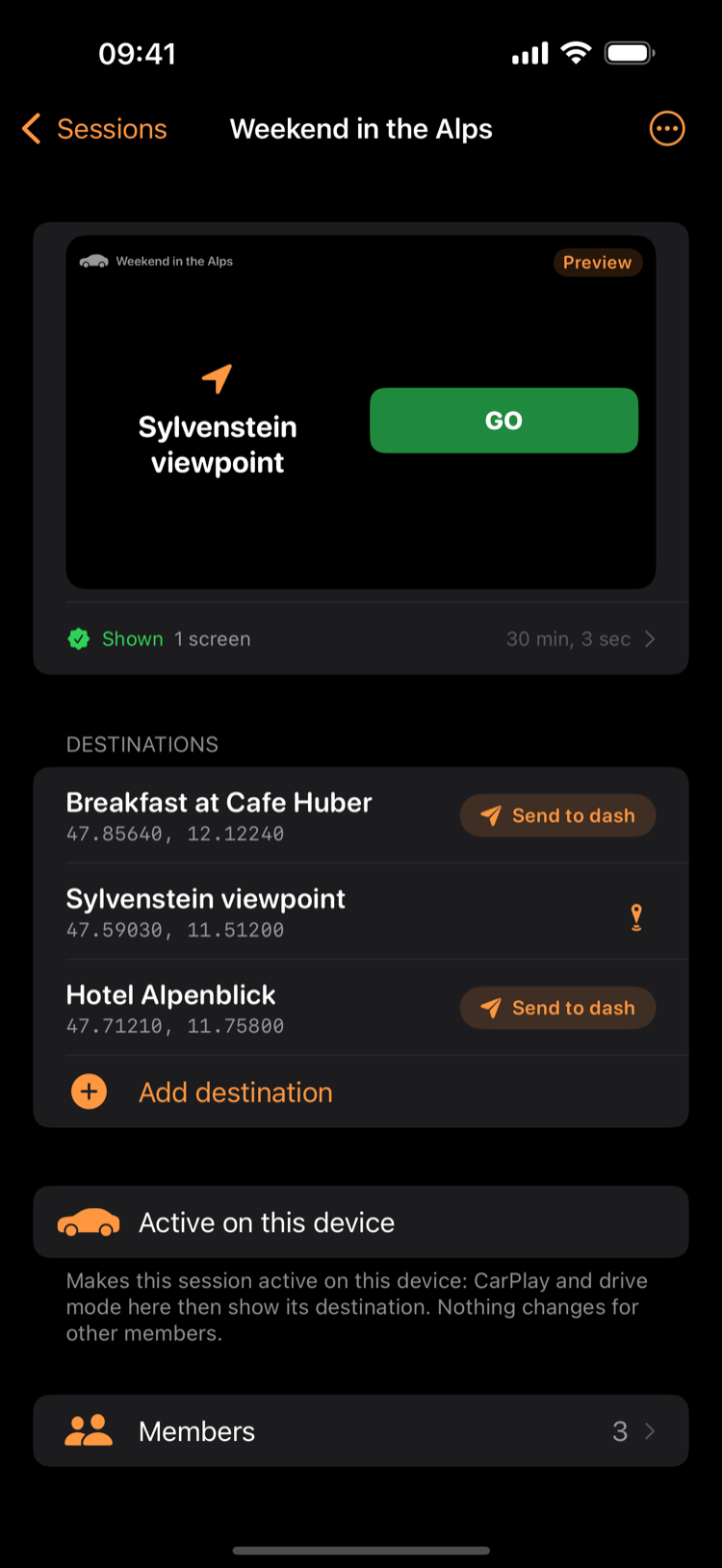
Collect cafes, viewpoints, and hotels as the trip unfolds. Search for a place, or share a maps link straight from another app. Send the next stop to the dash and it lands on the driver's screen in the same moment, ready to go.

A trip is a shared session. Share it with a QR code or a link, and everyone adds stops from their own phone. Every device stays in sync, in the car and at home.
No sign-up required: jump right in and plan your first trip. Secure access to your data with Apple or Google whenever you are ready.
Create a session and give it a name. Weekend in the Alps, for example.
Reveal the session's QR code or send an invite link. Anyone who joins can add stops and send them to the dash.
Send a destination to the dash and it appears on the CarPlay screen. One tap on GO starts navigation.
Open it and you are in. If the app is not installed yet, the invite page shows your join code so you can paste it once you have CoPlay.
About invite links CoPlay